9강 - 타원과 사각형 그리기
이번 강의에서는 다음 내용을 배웁니다.
- 타원과 둥근 사각형의 SDF 표현을 유도하기
- 둥근 사각형과 그 밖의 SDF에 드롭 섀도와 내부 그림자 추가하기
- 임의의 점이 타원 또는 둥근 사각형 안에 있는지 판정하기
2강에서는 SDF로 원을 그렸고, 이를 타원과 사각형으로 확장하기는 쉽습니다. 2D distance functions에는 2D 도형에 대한 SDF 식이 더 나와 있습니다.
float sdf_ellipse(vec2 p, vec2 r) {}
float sdf_rounded_box(vec2 p, vec2 b, vec4 r) {}
셰이더에서는 shape 변수로 이 세 가지 도형을 구분하므로, 같은 셰이더 묶음으로 그릴 수 있습니다.
if (shape < 0.5) {
  outerDistance = sdf_circle(v_FragCoord, 1.0);
  innerDistance = sdf_circle(v_FragCoord, r.x);
} else if (shape < 1.5) {
  outerDistance = sdf_ellipse(v_FragCoord, vec2(wh, 1.0));
  innerDistance = sdf_ellipse(v_FragCoord, r);
} else if (shape < 2.5) {
  outerDistance = sdf_rounded_box(v_FragCoord, vec2(wh, 1.0), 0.0);
  innerDistance = sdf_rounded_box(v_FragCoord, r, 0.0);
}
다음으로 SDF를 어떻게 유도하는지 살펴보겠습니다.
사각형
The SDF of a Box와 Leveraging Rust and the GPU to render user interfaces at 120 FPS는 유도 과정을 영상과 애니메이션으로 보여 줍니다.
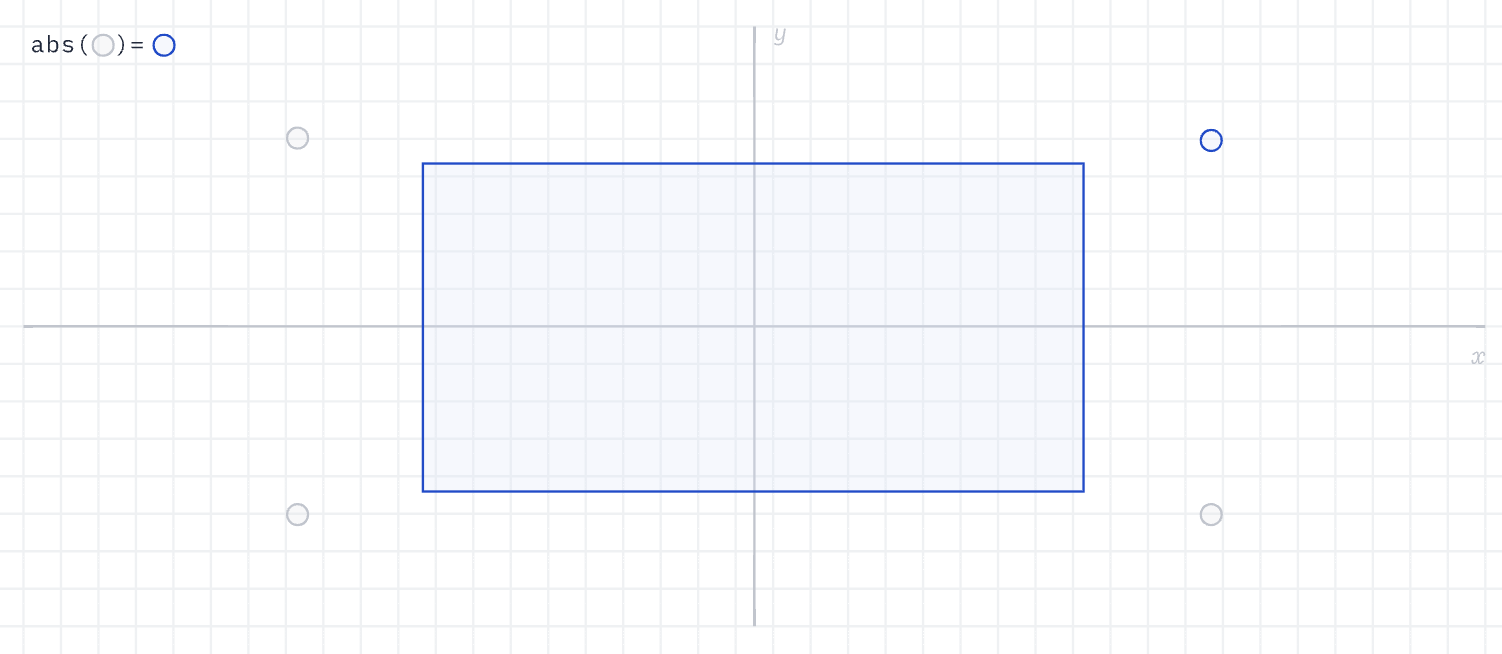
사각형의 대칭을 이용해 중심을 원점에 두면, 임의의 점에서 사각형 가장자리까지의 거리 문제를 abs() 함수로 제1사분면의 문제로 바꿀 수 있습니다. 여기서 p는 임의의 점의 좌표, b는 사각형 오른쪽 위 꼭짓점의 좌표이며, 중심이 원점과 일치하므로 [width / 2, height / 2]입니다. q는 그 점에서 오른쪽 위 꼭짓점으로 향하는 벡터입니다.
float sdf_box(vec2 p, vec2 b) {
  vec2 q = abs(p) - b;
}
이어서 점이 사각형 밖에 있는 경우를 봅니다. 사각형의 오른쪽 위 꼭짓점에서 바깥으로 뻗으면 네 사분면으로 나눌 수 있습니다. 아래 그림의 제1사분면에서는 거리가 q 벡터의 길이 length(q)입니다. 점이 제2사분면에 있으면 q.x가 음수이므로 거리는 q.y이고, 마찬가지로 제4사분면에 있으면 거리는 q.x입니다.
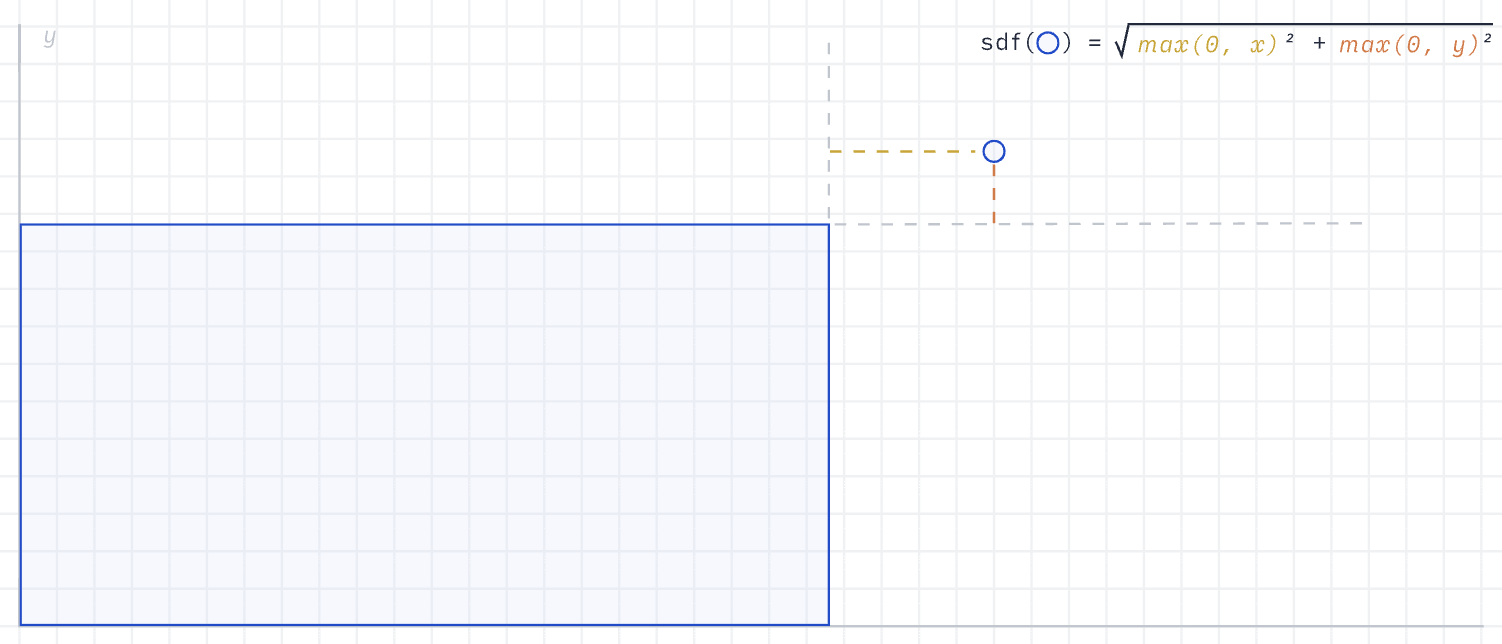
원저자는 length(max(q, 0.0))으로 이 세 경우를 하나로 묶었습니다. max()로 음수 성분을 없애, 셰이더의 분기 판정을 최대한 줄입니다. 이어서 점이 사각형 안에 있는 경우, 즉 위 그림의 제3사분면을 봅니다. 이때 q의 두 성분은 모두 음수이고, max(q.x, q.y)로 더 가까운 거리의 절댓값을 얻을 수 있습니다. 가장 바깥의 min()은 점이 안에 있는 경우를 앞의 세 경우와 하나로 묶으며, 이것도 분기를 줄이기 위한 것입니다. 완전한 SDF는 다음과 같습니다.
float sdf_box(vec2 p, vec2 b) {
  vec2 q = abs(p) - b;
  return length(max(q, 0.0)) + min(max(q.x, q.y), 0.0);
}
여기까지 오면 사각형을 그릴 수 있습니다. SVG <rect>를 참고해 다음 속성을 추가합니다.
const rect = new Rect({
    x,
    y,
    width,
    height,
    fill,
});
둥근 모서리 추가하기
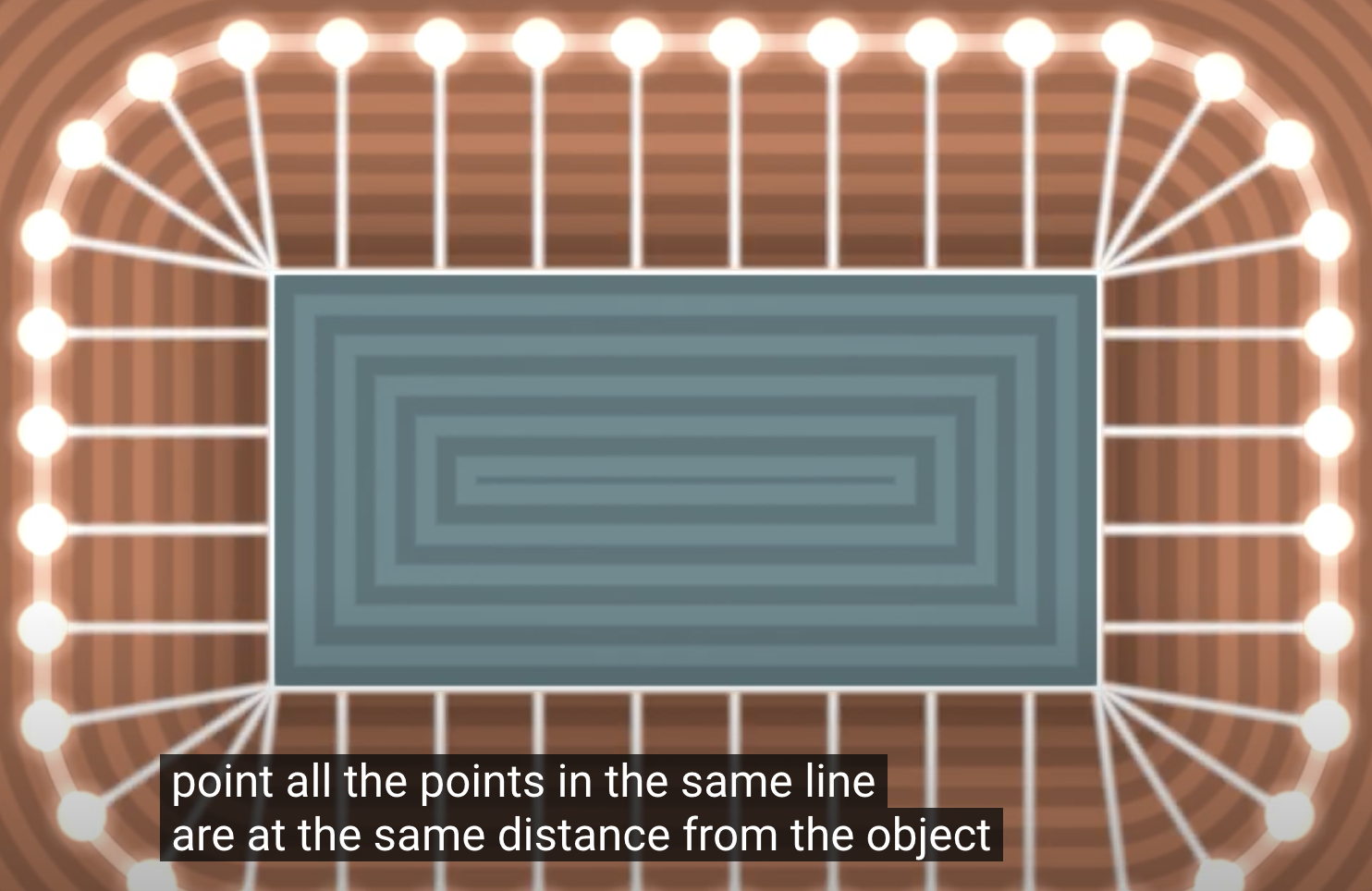
아래 그림은 Rounding Corners in SDFs에서 가져온 것입니다. 등고선으로 시각화한 거리장을 보면, 사각형 자체가 이미 둥글다는 것을 알 수 있습니다. 사각형 오른쪽 위 꼭짓점 근처의 점을 예로 들면, 거리가 같은 점이 하나가 아니라, 오른쪽 위 꼭짓점을 중심으로 한 원 위에 놓입니다.
사실 사각형뿐 아니라 SDF로 나타내는 모든 도형을 “둥근” 버전으로 바꿀 수 있습니다. 아래 그림은 2D distance functions에서 가져온 것입니다.
float opRound( in vec2 p, in float r ) {
  return sdShape(p) - r;
}
따라서 둥근 사각형의 완전한 SDF 표현은 다음과 같습니다.
float sdf_rounded_box(vec2 p, vec2 b, float r) {
  vec2 q = abs(p) - b + r;
  return length(max(q, 0.0)) + min(max(q.x, q.y), 0.0) - r;
}
Figma의 이름을 따라 cornerRadius를 쓰지만, SDF만으로는 smoothing 효과를 낼 수 없습니다. 자세한 내용은 Adjust corner radius and smoothing과 Desperately seeking squircles를 참고하세요. 또한 모서리마다 다른 반지름을 지원할 수도 있습니다. Zed Blade WGSL을 참고하세요. 이것은 Zed가 blade 렌더러를 기반으로 작성한 셰이더이며, WGSL 문법을 사용합니다.
$icCanvas2 = call(() => {
    return document.createElement('ic-canvas-lesson9');
});call(() => {
const { Canvas, Rect } = Lesson9;
const stats = new Stats();
stats.showPanel(0);
const $stats = stats.dom;
$stats.style.position = 'absolute';
$stats.style.left = '0px';
$stats.style.top = '0px';
$icCanvas2.parentElement.style.position = 'relative';
$icCanvas2.parentElement.appendChild($stats);
$icCanvas2.addEventListener('ic-ready', (e) => {
const canvas = e.detail;
for (let i = 0; i < 1000; i++) {
const fill = `rgb(${Math.floor(Math.random() * 255)},${Math.floor(
Math.random() * 255,
)},${Math.floor(Math.random() * 255)})`;
const rect = new Rect({
x: Math.random() * 1000,
y: Math.random() * 1000,
fill,
cornerRadius: 10,
});
// rect.x = Math.random() * 1000;
// rect.y = Math.random() * 1000;
rect.width = Math.random() * 40;
rect.height = Math.random() * 40;
canvas.appendChild(rect);
rect.addEventListener('pointerenter', () => {
rect.fill = 'red';
});
rect.addEventListener('pointerleave', () => {
rect.fill = fill;
});
}
});
$icCanvas2.addEventListener('ic-frame', (e) => {
stats.update();
});
});드롭 섀도 추가하기
그림자를 이야기하면 CSS의 box-shadow와 filter: drop-shadow()를 들어 보셨을 수 있습니다. 아래 그림은 Drop-Shadow: The Underrated CSS Filter 글에서 가져온 것으로, 둘의 차이를 직관적으로 보여 줍니다.
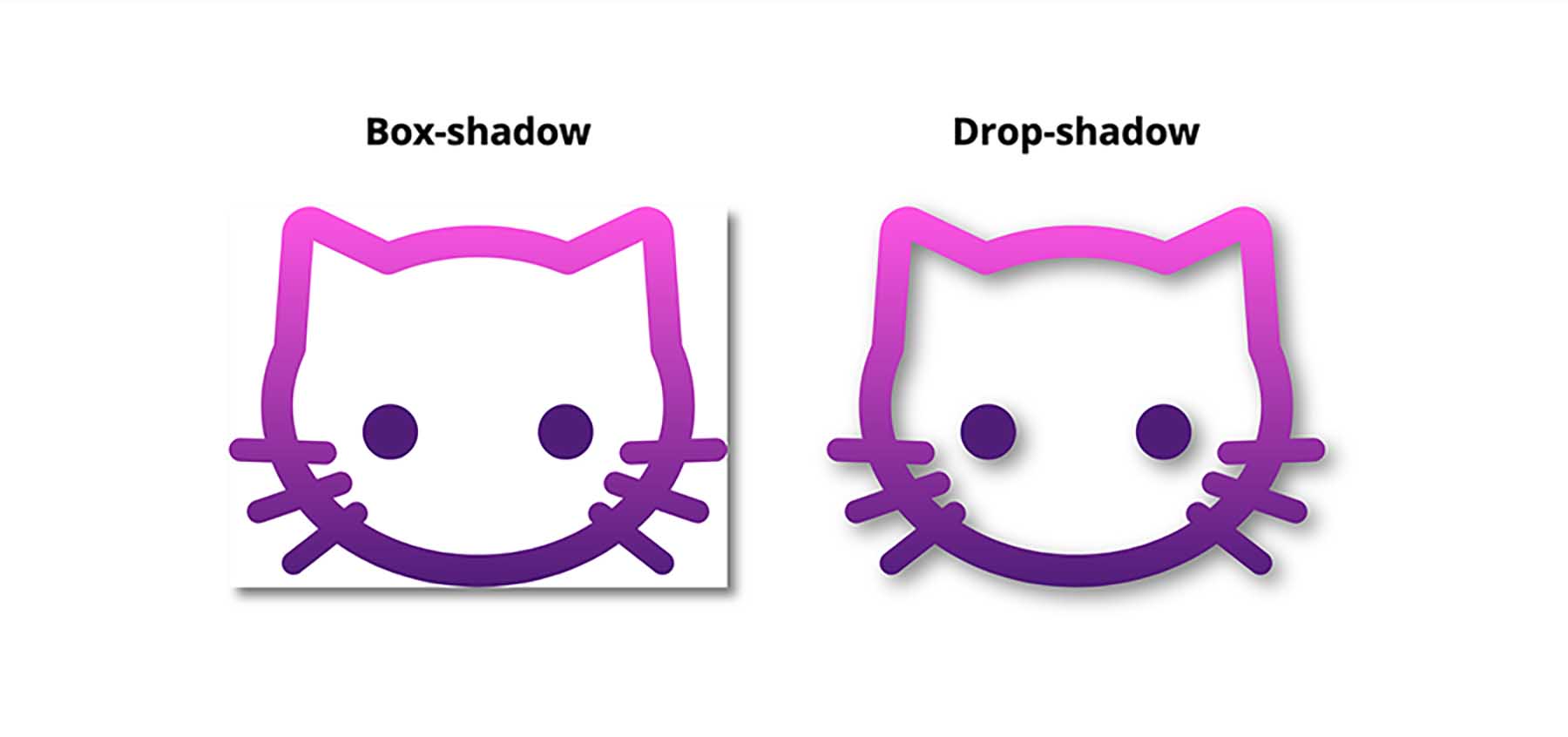
후자가 보통 더 자주 쓰이며, tailwindcss - Drop Shadow가 그 예입니다. 그래서 사각형에 다음 속성을 추가합니다.
rect.dropShadowColor = 'black';
rect.dropShadowOffsetX = 10;
rect.dropShadowOffsetY = 10;
rect.dropShadowBlurRadius = 5;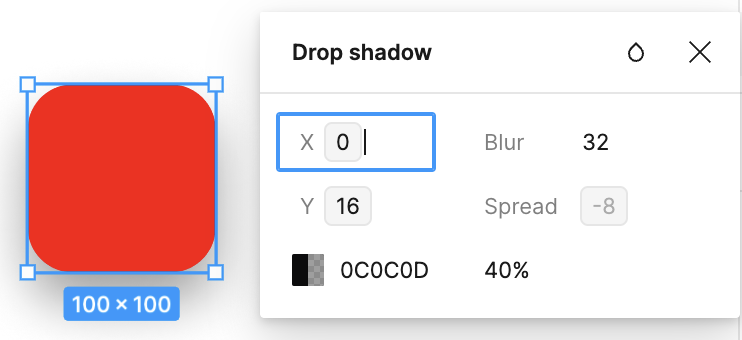
다음으로 WebGL / WebGPU로 2D 도형의 그림자를 그립니다. 일반적인 방법은 후처리에서 가우시안 블러를 쓰는 것이며, Pixi.js의 DropShadowFilter가 그 예입니다. 2D 가우시안 블러는 가로와 세로의 1D 효과 두 개로 분해할 수 있지만, 합성곱 연산은 여전히 인접 픽셀을 샘플링해야 합니다. 샘플 수는 합성곱 커널의 크기에 따라 달라집니다.
Figma의 CTO Evan Wallace는 Fast Rounded Rectangle Shadows에서 더 빠른 근사 방법을 소개했습니다. 텍스처를 샘플링할 필요가 없으며, Leveraging Rust and the GPU to render user interfaces at 120 FPS에서도 더 자세히 설명합니다. 가우시안 함수와 계단 함수의 합성곱은 가우시안 함수의 적분과 같고, 그 결과는 오차 함수 Error function (erf라고도 합니다)입니다. 따라서 흐린 사각형을 만드는 일은, 모서리 반지름은 고려하지 않은 채, 각 차원을 따로 흐리게 한 뒤 두 결과의 교집합을 취하는 것과 같습니다.
가우시안 함수:
오차 함수는 가우시안 함수의 적분이며, 정규 분포의 누적 분포 함수를 나타내는 데 쓰입니다.
오차 함수의 흔한 근사는 Abramowitz and Stegun. Handbook of Mathematical Functions.에서 옵니다.
다항식 각 항의 계수는 다음과 같습니다.
아래 구현은 Zed Blade WGSL에서 가져온 것이며, 이를 GLSL로 다시 썼습니다. Blurred rounded rectangles도 erf의 또 다른 버전을 제시합니다.
vec2 erf(vec2 x) {
  vec2 s = sign(x), a = abs(x);
  x = 1.0 + (0.278393 + (0.230389 + 0.078108 * (a * a)) * a) * a;
  x *= x;
  return s - s / (x * x);
}
일단 둥근 모서리는 제쳐 두고 최종 그림자 마스크 값을 계산합니다. 여기서 그림자의 경계는 integral_x와 integral_y의 차이로 정해집니다. integral_x.x - integral_x.y는 x축에서 그림자의 너비를 계산하고, integral_y.x - integral_y.y는 y축에서 그림자의 높이를 계산합니다. 이 두 값을 곱하면 최종 그림자 마스크 값이 됩니다.
// Return the mask for the shadow of a box from lower to upper
float rect_shadow(vec2 pixel_position, vec2 origin, vec2 size, float sigma) {
  vec2 bottom_right = origin + size;
  vec2 x_distance = vec2(pixel_position.x - origin.x, pixel_position.x - bottom_right.x);
  vec2 y_distance = vec2(pixel_position.y - origin.y, pixel_position.y - bottom_right.y);
  vec2 integral_x = 0.5 + 0.5 * erf(x_distance * (sqrt(0.5) / sigma));
  vec2 integral_y = 0.5 + 0.5 * erf(y_distance * (sqrt(0.5) / sigma));
  return (integral_x.x - integral_x.y) * (integral_y.x - integral_y.y);
}
그러나 위와 같은 닫힌 형식의 해는, 둥근 사각형과 가우시안의 2차원 합성곱에는 존재하지 않습니다. 둥근 사각형의 식이 분리 가능하지 않기 때문입니다. Evan Wallace의 근사가 영리한 점은, 한 축을 따라 닫힌 형식의 정확한 합성곱을 수행한 다음, 반대 축을 따라 가우시안을 유한한 횟수만큼 직접 밀어 가며 계산하는 데 있습니다.
float blur_along_x(float x, float y, float sigma, float corner, vec2 half_size) {
  float delta = min(half_size.y - corner - abs(y), 0.);
  float curved =
  half_size.x - corner + sqrt(max(0., corner * corner - delta * delta));
  vec2 integral =
  0.5 + 0.5 * erf((x + vec2(-curved, curved)) * (sqrt(0.5) / sigma));
  return integral.y - integral.x;
}// The signal is only non-zero in a limited range, so don't waste samples
float low = center_to_point.y - half_size.y;
float high = center_to_point.y + half_size.y;
float start = clamp(-3. * blur_radius, low, high);
float end = clamp(3. * blur_radius, low, high);
// Accumulate samples (we can get away with surprisingly few samples)
float step = (end - start) / 4.;
float y = start + step * 0.5;
for (int i = 0; i < 4; i++) {
alpha += blur_along_x(center_to_point.x, center_to_point.y - y, blur_radius,
cornerRadius, half_size) *
gaussian(y, blur_radius) * step;
y += step;
}구현에서는 사각형마다 그림자를 따로 그려야 하므로, 앞에서 합친 배치의 효과가 깨집니다. 그리기 순서를 엄격히 지켜야 하고, 다시 그릴 때마다 순서를 다시 매겨야 하기 때문입니다. 아래 코드는 Fast Rounded Rectangle Shadows에서 가져왔습니다. 그리기 전에 미리 정한 깊이로 모든 사각형을 정렬한 다음, 그림자와 본체를 차례로 그립니다.
render() {
  boxes.sort(function(a, b) {
    return a.depth - b.depth;
  });
  for (var i = 0; i < boxes.length; i++) {
    boxes[i].callback(); // Draw shadow first and then the rectangle itself.
  }
}
예를 들어 아래 두 사각형은 다음 순서로 그립니다. 초록 사각형의 그림자, 초록 사각형, 빨간 사각형의 그림자, 빨간 사각형. 이전 방식대로 그림자 둘과 사각형 본체 둘을 각각 두 개의 배치로 합쳐 그리면, 빨간 사각형의 그림자가 초록 사각형 위에 떨어지게 할 수 없습니다. 그래서 사용할 때는 그림자가 있는 사각형에 batchable = false를 설정해야 합니다.
$icCanvas3 = call(() => {
    return document.createElement('ic-canvas-lesson9');
});call(() => {
const { Canvas, Rect } = Lesson9;
const stats = new Stats();
stats.showPanel(0);
const $stats = stats.dom;
$stats.style.position = 'absolute';
$stats.style.left = '0px';
$stats.style.top = '0px';
$icCanvas3.parentElement.style.position = 'relative';
$icCanvas3.parentElement.appendChild($stats);
$icCanvas3.addEventListener('ic-ready', (e) => {
const canvas = e.detail;
const rect = new Rect({
x: 50,
y: 50,
fill: 'green',
cornerRadius: 50,
batchable: false,
dropShadowColor: 'black',
dropShadowOffsetX: 10,
dropShadowOffsetY: 10,
dropShadowBlurRadius: 10,
});
rect.width = 400;
rect.height = 100;
canvas.appendChild(rect);
const rect2 = new Rect({
x: 100,
y: 100,
fill: 'red',
batchable: false,
cornerRadius: 50,
dropShadowColor: 'black',
dropShadowBlurRadius: 10,
});
rect2.width = 400;
rect2.height = 100;
canvas.appendChild(rect2);
});
$icCanvas3.addEventListener('ic-frame', (e) => {
stats.update();
});
});한 가지 더 주의할 점은, 그림자 블러 반지름 때문에 사각형을 원래 크기에서 한 바퀴 바깥으로 늘려야 한다는 것입니다. 여기서는 3 * dropShadowBlurRadius로 둡니다.
float margin = 3.0 * dropShadow.z;
origin += dropShadow.xy;
v_Origin = origin;
v_Size = size;

origin -= margin;
size += 2.0 * margin;
vec2 center = origin + size / 2.0;
v_Point = center + a_FragCoord * (size / 2.0);
마지막으로 그림자는 RenderBounds 계산에도 영향을 줍니다. 그렇지 않으면 사각형 본체는 뷰포트 밖에 있지만 그림자는 뷰포트 안에 있을 때, 사각형이 잘못 컬링됩니다.
this.renderBounds.addBounds(
    new AABB(
        x + dropShadowOffsetX - dropShadowBlurRadius,
        y + dropShadowOffsetY - dropShadowBlurRadius,
        x + dropShadowOffsetX + width + dropShadowBlurRadius,
        y + dropShadowOffsetY + height + dropShadowBlurRadius,
    ),
);
이 접근으로 흥미로운 효과도 만들 수 있습니다. Shape Lens Blur Effect with SDFs and WebGL을 참고하세요.
분명히 위 방법은 둥근 사각형에만 통합니다. 원, 타원, 그 밖의 SDF 표현에 더 일반적인 방법이 있을까요? Shadertoy에 Drop shadow of rounded rect라는 예제가 있습니다. 흥미롭게도 이 예제를 바탕으로, 바깥 그림자와 내부 그림자를 모두 구현한 예제도 있습니다. 아래에서는 내부 그림자 구현에 초점을 맞춥니다.
내부 그림자 추가하기
아래 이미지는 Figma의 내부 그림자 효과이며, Button 같은 UI 컴포넌트에서 자주 쓰입니다.
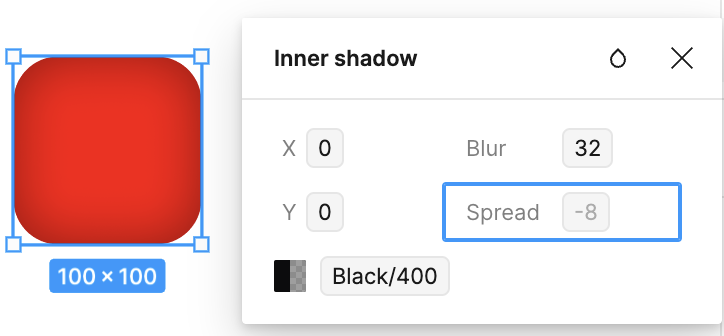
다음 속성을 추가해 보겠습니다.
rect.innerShadowColor = 'black';
rect.innerShadowOffsetX = 10;
rect.innerShadowOffsetY = 10;
rect.innerShadowBlurRadius = 5;
Shadertoy의 예제 Inner shadow of rounded rect를 참고해, 현재의 세 도형 각각에 그림자를 그리는 로직을 비슷하게 추가합니다. 여기서는 부드럽게 만들기 위해 sigmoid를 사용합니다.
float make_shadow(vec2 pos, vec2 halfSize, float cornerRd, float blurRd, float distMul, float shape) {
  float distance;
  if (shape < 0.5) {
    distance = sdf_circle(pos, halfSize.x);
  } else if (shape < 1.5) {
    distance = sdf_ellipse(pos, halfSize);
  } else if (shape < 2.5) {
    distance = sdf_rounded_box(pos, halfSize, cornerRd + blurRd);
  }
  float dist = sigmoid(distMul * distance / blurRd);
  return clamp(dist, 0.0, 1.0);
}$icCanvas4 = call(() => {
return document.createElement('ic-canvas-lesson9');
});call(() => {
const { Canvas, Rect, Circle, Ellipse } = Lesson9;
const stats = new Stats();
stats.showPanel(0);
const $stats = stats.dom;
$stats.style.position = 'absolute';
$stats.style.left = '0px';
$stats.style.top = '0px';
$icCanvas4.parentElement.style.position = 'relative';
$icCanvas4.parentElement.appendChild($stats);
$icCanvas4.addEventListener('ic-ready', (e) => {
const canvas = e.detail;
for (let i = 0; i < 10; i++) {
const fill = `rgb(${Math.floor(Math.random() * 255)},${Math.floor(
Math.random() * 255,
)},${Math.floor(Math.random() * 255)})`;
const rect = new Rect({
x: Math.random() * 1000,
y: Math.random() * 1000,
fill,
cornerRadius: 50,
innerShadowColor: 'black',
innerShadowOffsetX: Math.random() * 20 - 10,
innerShadowOffsetY: Math.random() * 20 - 10,
innerShadowBlurRadius: Math.random() * 10,
});
rect.width = 200;
rect.height = 100;
canvas.appendChild(rect);
const circle = new Circle({
cx: Math.random() * 1000,
cy: Math.random() * 1000,
r: 100,
fill,
innerShadowColor: 'black',
innerShadowOffsetX: Math.random() * 20 - 10,
innerShadowOffsetY: Math.random() * 20 - 10,
innerShadowBlurRadius: Math.random() * 10,
});
canvas.appendChild(circle);
const ellipse = new Ellipse({
cx: Math.random() * 1000,
cy: Math.random() * 1000,
rx: 100,
ry: 50,
fill,
innerShadowColor: 'blue',
innerShadowOffsetX: Math.random() * 20 - 10,
innerShadowOffsetY: Math.random() * 20 - 10,
innerShadowBlurRadius: Math.random() * 10,
});
canvas.appendChild(ellipse);
}
});
$icCanvas4.addEventListener('ic-frame', (e) => {
stats.update();
});
});타원
임의의 점에서 원까지의 최근접 거리를 구하는 것과 달리, 타원을 해석적으로 정확히 다루는 방법은 훨씬 복잡합니다. Distance to an ellipse는 두 가지 방법을 제시합니다. 사차 방정식과 뉴턴법입니다.
사차 방정식
타원은
전개하면 다음과 같습니다.
최근접점에서 도함수는 0입니다.
이것은
사차항의 계수를 1로 만들어 Monic Polynomial을 얻으려면, 위의 각 계수를
이렇게 하면 계수가 다음과 같은 Quartic Equation이 됩니다.
최고차 계수가 1이므로, Resolvent Cubic을 이용해 삼차 방정식 Cubic Formula를 푸는 문제로 바꿀 수 있습니다.
계수의 대응 관계는 다음과 같습니다.
대입하면 다음과 같습니다.
Cubic Formula를 풀 때는 이차항 계수를 없애려고 합니다.
위의 식을 계속 단순화하기 위해 다음을 둡니다.
표준형은
이 방법은 계산 비용이 큽니다. Distance to an ellipse에 나온 ShaderToy 예제는, 아래에서 소개할 두 방법보다 FPS가 훨씬 낮습니다.
뉴턴법
임의의 점
여기서 도함수는 다음과 같습니다.
대입하면 다음과 같습니다.
Newton's method는 실수 영역과 복소수 영역에서 방정식을 근사적으로 푸는 방법입니다.
대입하면 다음과 같습니다.
Distance to an ellipse의 원저자는 5번 반복으로 아주 좋은 결과를 얻었습니다.
for (int i=0; i<5; i++) {
  vec2 cs = vec2(cos(w),sin(w));
  vec2 u = ab*vec2( cs.x,cs.y);
  vec2 v = ab*vec2(-cs.y,cs.x);
  w = w + dot(p-u,v)/(dot(p-u,u)+dot(v,v));
}
아래에서 필요한 것은
bool s = dot(p/ab,p/ab)>1.0;타원 밖에 있으면 원으로 늘릴 수 있습니다. 다음 소절에서 설명하는 방법도 이것을 사용합니다. 이때
타원 안에 있으면 장반축에 해당하는
float w = s ? atan(p.y*ab.x, p.x*ab.y) :
  ((ab.x*(p.x-ab.x)<ab.y*(p.y-ab.y))? 1.5707963 : 0.0);
앞에서 일변수 사차 방정식을 푸는 방법과 비교하면, 이 방법의 비용은 더 작습니다. 그래도 반복 횟수가 고정된 for 루프가 들어 있고, GLSL을 컴파일할 때 그 루프는 펼쳐집니다. Loop performance in a shader를 참고하세요. 마지막으로, 비용이 가장 작은 근사 추정 방법을 소개합니다.
원으로 늘리는 근사법
Ellipsoid SDF는 단위 원으로 늘린 다음 다시 타원으로 되돌리는 이 방법을 설명합니다. 되돌릴 때 늘리는 계수는 어떻게 고를까요? 점이 X축 위에 있으면 계수는 r.x이고, Y축 위에서는 r.y입니다. 먼저 둘 중 더 작은 값을 고릅니다.
float sdf_ellipse_V1( in vec2 p, in vec2 r )
{
  float k1 = length(p/r);
  return (k1-1.0)*min(r.x,r.y);
}
실제로 렌더링해 보면, 이 방식은 장축에서 문제가 뚜렷하고 잘 맞지 않습니다.
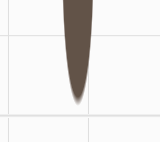
원저자가 개선판을 제시했습니다.
float sdf_ellipse_V3( in vec3 p, in vec3 r )
{
  float k1 = length(p/r);
  return length(p)*(1.0-1.0/k1);
}
그러나 실제로 렌더링해 보면, 이 방식은 가장자리에 들쭉날쭉한 부분이 뚜렷합니다.

결국 저자는 그래디언트를 고려하는 항을 넣었고, 우리도 이 방식을 사용합니다.
float sdf_ellipse_V2( in vec2 p, in vec2 r )
{
  float k1 = length(p/r);
  float k2 = length(p/(r*r));
  return k1*(k1-1.0)/k2;
}
결과를 보면 훨씬 좋아집니다.
$icCanvas = call(() => {
    return document.createElement('ic-canvas-lesson9');
});call(() => {
const { Canvas, Ellipse } = Lesson9;
const stats = new Stats();
stats.showPanel(0);
const $stats = stats.dom;
$stats.style.position = 'absolute';
$stats.style.left = '0px';
$stats.style.top = '0px';
$icCanvas.parentElement.style.position = 'relative';
$icCanvas.parentElement.appendChild($stats);
$icCanvas.addEventListener('ic-ready', (e) => {
const canvas = e.detail;
for (let i = 0; i < 1000; i++) {
const fill = `rgb(${Math.floor(Math.random() * 255)},${Math.floor(
Math.random() * 255,
)},${Math.floor(Math.random() * 255)})`;
const ellipse = new Ellipse({
cx: Math.random() * 1000,
cy: Math.random() * 1000,
rx: Math.random() * 20,
ry: Math.random() * 20,
fill,
});
canvas.appendChild(ellipse);
ellipse.addEventListener('pointerenter', () => {
ellipse.fill = 'red';
});
ellipse.addEventListener('pointerleave', () => {
ellipse.fill = fill;
});
}
});
$icCanvas.addEventListener('ic-frame', (e) => {
stats.update();
});
});피킹
현재 피킹 플러그인은 기하학적 방법을 사용하므로, 타원과 둥근 사각형에 대해 판정 방법을 따로 구현해야 합니다. 나중에 더 일반적인, 색으로 부호화하는 GPU 기반 피킹 방법을 소개하겠습니다. 위의 두 예시에서는 아무 도형 위에 마우스를 올려 피킹 효과를 확인할 수 있습니다.
타원
타원의 피킹 판정은 더 단순합니다. 예를 들어 기본적으로 채우기 영역과 스트로크 영역을 모두 고려합니다.
function isPointInEllipse(
    x: number,
    y: number,
    h: number,
    k: number,
    a: number,
    b: number,
) {
    const dx = x - h;
    const dy = y - k;

    const squaredDistance = (dx * dx) / (a * a) + (dy * dy) / (b * b);

    // Inside ellipse
    return squaredDistance <= 1;
}
둥근 사각형
둥근 모서리를 고려하지 않으면 이것도 매우 단순합니다.
function isPointInRoundedRectangle(
    x: number,
    y: number,
    x1: number,
    y1: number,
    x2: number,
    y2: number,
    r: number,
) {
    // Determine if a point is inside the corners of a rectangle.
    function isInsideCorner(
        x: number,
        y: number,
        cornerX: number,
        cornerY: number,
        r: number,
    ) {
        const distance = Math.sqrt(
            Math.pow(x - cornerX, 2) + Math.pow(y - cornerY, 2),
        );
        return distance <= r;
    }

    // Determine if a point is inside a rounded rectangle
    if (x >= x1 && x <= x2 && y >= y1 && y <= y2) {
        // Points inside the rectangle
        if (
            isInsideCorner(x, y, x1 + r, y1 + r, r) || // top-left
            isInsideCorner(x, y, x2 - r, y1 + r, r) || // top-right
            isInsideCorner(x, y, x2 - r, y2 - r, r) || // bottom-right
            isInsideCorner(x, y, x1 + r, y2 - r, r) // bottom-left
        ) {
            return true; // Points inside the corner
        }
        return !(
            x <= x1 + r ||
            x >= x2 - r || // The point is on the non-circular boundary of the rectangle
            y <= y1 + r ||
            y >= y2 - r
        );
    }
    return false; // Points outside the rectangle
}