34강 - Group, Frame 과 클리핑
현재 Group / g는 기하학적 경계(예를 들어 x/y/width/height)가 없는 논리적 묶음이므로, 자식에 클리핑을 적용하지 않습니다. tldraw는 Group과 Frame을 모두 Structural shapes로 제공합니다.
Group
Figma에서 group은 본질적으로 폴더와 비슷한 “컨테이너” 역할을 합니다. 자세한 내용은 The difference between frames and groups를 참고하세요.
- 여러 요소를 하나의 단위로 조작합니다(이동, 크기 조절 등).
- 클릭하면 기본적으로 그룹 전체가 선택됩니다. 그룹의 크기는 자식 요소가 자동으로 결정합니다.
- 두 번 클릭하면 그룹 안으로 들어가 개별 요소를 편집할 수 있습니다.
- 그룹화/그룹 해제
- 컨텍스트 메뉴와 키보드 단축키를 사용합니다.
- 레이어 패널에서 드래그 앤 드롭합니다.
드래그 앤 드롭으로 그룹화
드래그 앤 드롭으로 그룹화하기 전에, sortablejs로 같은 단계 목록 안의 항목을 드래그 앤 드롭으로 정렬할 수 있게 할 수 있습니다.
import Sortable from 'sortablejs';

const lists = root.querySelectorAll<HTMLElement>('.layer-siblings');
lists.forEach((el) => {
    const parentId = el.dataset.layerParentId ?? '';
    const sortable = Sortable.create(el, {
        animation: 150,
        draggable: '.layer-branch',
        filter: '.layer-branch--locked', // 锁定图层无法拖拽
        preventOnFilter: false,
        group: {
            name: `layers-${parentId || 'root'}`,
            pull: true,
            put: true,
        },
        onEnd: (evt) => {
            if (evt.oldIndex === evt.newIndex) {
                return;
            }
            const to = evt.to as HTMLElement;
            const orderedIds = Array.from(to.children)
                .filter((c): c is HTMLElement =>
                    c.classList.contains('layer-branch'),
                )
                .map((c) => c.dataset.nodeId)
                .filter((id): id is string => !!id);
            // 所有兄弟节点重新排序,依次设置 zIndex
            this.applyLayerSiblingOrder(
                to.dataset.layerParentId ?? '',
                orderedIds,
            );
        },
    });
    this.sortableInstances.push(sortable);
});
드래그하여 그룹화하거나 그룹을 해제하려면 그룹을 넘는 조작이 필요합니다.
스텐실 버퍼
tldraw에서 클리핑은 CSS clip-path로 하며, 부모에서 getClipPath를 재정의하여 지정합니다. 내장 Frame이 이렇게 구현되어 있습니다. Figma에서 이 속성은 clip content라고 부릅니다. Frame properties in Figma를 참고하세요.
pencil.dev에서 Frame은 다음과 같이 정의됩니다. 자식 요소를 담을 수 있고 클리핑 기능을 가진 사각형입니다.
/** A frame is a rectangle that can have children. */
export interface Frame extends Rectangleish, CanHaveChildren, Layout {
    type: 'frame';
    /** Visually clip content that overflows the frame bounds. Default is false. */
    clip?: BooleanOrVariable;
    placeholder?: boolean;
    /** The presence of this property indicates that this frame is a "slot" - which means that it is intended be customized with children in instances of the parent component. Each element of the array is an ID of a "recommended" reusable component, one which fits semantically as a child here (e.g. inside a menu bar, the content slot would recommend IDs of various menu item components). */
    slot?: string[];
}
범용성을 위해, 어떤 도형이든 클리핑 부모가 될 수 있게 합니다. 도형 밖의 자식은 잘리고, 부모 자체는 fill/stroke가 적용된 채로 정상적으로 렌더링됩니다. 속성은 다음과 같이 선언합니다.
{
    clipChildren: true;
}
다음으로 WebGL / WebGPU에서 이 클리핑을 구현하는 방법을 살펴봅니다.
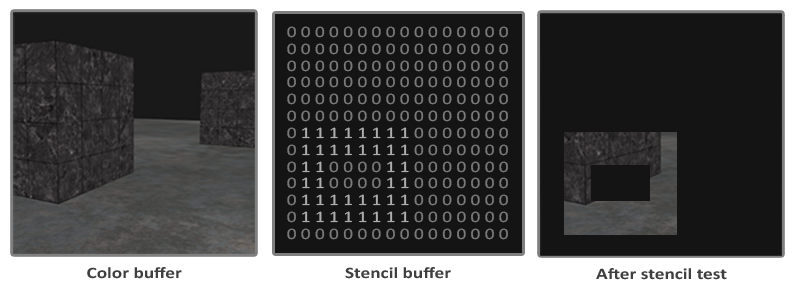
도형이 클리핑 컨테이너가 되면 RenderPass에서 스텐실 버퍼에도 렌더링해야 합니다. 기본값은 0입니다.
{
    stencilWrite: true, // enable writing to stencil buffer
    stencilFront: {
        compare: CompareFunction.ALWAYS,
        passOp: StencilOp.REPLACE,
    },
    stencilBack: {
        compare: CompareFunction.ALWAYS,
        passOp: StencilOp.REPLACE,
    }
}
이어서 자식을 렌더링할 때 비교할 기준값을 스텐실 버퍼에 기록합니다. 이 값은 [0-255] 범위일 수 있으며, 위 그림에서는 1입니다.
renderPass.setStencilReference(STENCIL_CLIP_REF);클리핑된 자식을 렌더링할 때는 버퍼 값이 이 기준값과 같은지 확인합니다. 값이 0인 영역은 그리지 않으므로 클리핑이 됩니다.
{
    stencilFront: {
        compare: CompareFunction.EQUAL,
        passOp: StencilOp.KEEP,
    }
}
지우개 효과
이제 25강 - 비원자적 지우개에서 남은 부분을 구현할 수 있습니다. 지우개 효과는 클리핑과 반대입니다. CSS clip-path는 “보이는” 영역을 정의하고, SVG의 <clipPath>도 같습니다. 둘 다 “보이지 않는” 영역은 정의할 수 없습니다.
SVG의 <mask>는 할 수 있습니다. Clipping and masking in SVG를 참고하세요. WebGL / WebGPU에서는 비교를 뒤집기만 하면 됩니다.
{
    stencilFront: {
        compare: CompareFunction.EQUAL,
        compare: CompareFunction.NOTEQUAL,
        passOp: StencilOp.KEEP,
    }
}
그래서 clip 모드와 erase 모드를 구분하는 속성도 필요합니다.
{
    clipChildren: true,
    clipMode: 'erase', // 'clip' | 'erase'
}
프래그먼트 셰이더에서 스텐실 버퍼를 쓸 때는 평소의 알파 기반 discard 논리를 건너뛰어야 합니다. 2강 - SDF를 참고하세요. 그렇지 않으면 fill='none'일 때 올바른 렌더링이 되지 않습니다.
// sdf.glsl
#ifdef USE_STENCIL
  // Stencil pass: discard by geometry (SDF distance), not alpha. Include the same
  // anti-alias band as the normal pass (fwidth(distance)) so the stencil boundary
  // matches the visible shape and avoids edge holes.
  float outerBoundary = (strokeAlignment < 1.5) ? 0.0 : strokeWidth;
  if (distance > outerBoundary)
    discard;
#else
  if (outputColor.a < epsilon)
    discard;
#endif
이미지로 내보내기
클리핑된 요소 하나를 이미지로 내보낼 때는, 그 경계와 부모 경계의 교집합을 OffscreenCanvas에 그릴 크기로 쓰거나, SVG로 내보낼 때 viewBox 크기로 씁니다.
const { minX, minY, maxX, maxY } =
    entity.read(ComputedBounds).renderWorldBounds;
const {
    minX: parentMinX,
    minY: parentMinY,
    maxX: parentMaxX,
    maxY: parentMaxY,
} = parentEntity.read(ComputedBounds).renderWorldBounds;
const isectMinX = Math.max(minX, parentMinX);
const isectMinY = Math.max(minY, parentMinY);
const isectMaxX = Math.min(maxX, parentMaxX);
const isectMaxY = Math.min(maxY, parentMaxY);
bounds.addFrame(isectMinX, isectMinY, isectMaxX, isectMaxY);
PNG 내보내기
한 가지 주의점은, 클리핑된 자식만 내보내더라도 부모를 먼저 렌더링해야 한다는 것입니다.
SVG 내보내기
먼저 clipMode='clip'인 경우입니다.
클리핑 부모에는 대응하는 <g>가 있습니다. 그 clip-path가 도형 자신의 정의를 참조하도록 설정합니다. <clipPath> 자체는 렌더링되지 않습니다.
<g clip-path="url(#clip-path-frame-1)" transform="matrix(1,0,0,1,100,100)">
    <defs>
        <clipPath id="clip-path-frame-1">
            <ellipse
                id="node-frame-1"
                fill="green"
                cx="100"
                cy="100"
                rx="100"
                ry="100"
            />
        </clipPath>
    </defs>
    <ellipse
        id="node-frame-1"
        fill="green"
        cx="100"
        cy="100"
        rx="100"
        ry="100"
    />
    <rect
        id="node-rect-1"
        fill="red"
        width="100"
        height="100"
        transform="matrix(1,0,0,1,-50,-50)"
    />
</g>clipMode='erase'일 때 SVG 마스크 규칙은 다음과 같습니다.
- 흰색(휘도 1): 마스크된 내용이 보입니다.
- 검은색(휘도 0): 마스크된 내용이 숨겨집니다.
먼저 큰 흰색 사각형을 그린 다음, 지우는 도형을 검은색으로 그립니다.
const $whiteRect = createSVGElement('rect');
$whiteRect.setAttribute('x', '-10000');
$whiteRect.setAttribute('y', '-10000');
$whiteRect.setAttribute('width', '20000');
$whiteRect.setAttribute('height', '20000');
$whiteRect.setAttribute('fill', 'white');
$clipPath.appendChild($whiteRect);

$parentNode.setAttribute('fill', 'black');
$parentNode.setAttribute('stroke', 'black');
결과 SVG 구조는 다음과 같습니다.
<defs xmlns="http://www.w3.org/2000/svg">
    <mask id="mask-frame-1">
        <rect x="-10000" y="-10000" width="20000" height="20000" fill="white" />
        <rect fill="black" width="100" height="100" stroke="black" />
    </mask>
</defs>
이미지 자르기
자르기는 이미지에 가장 자주 쓰입니다. 자세한 내용은 Crop an image와 image cropping in excalidraw를 참고하세요.
편집기에서 자르기는 보통 원본 이미지를 보존하므로, 잘린 영역은 시각적으로만 숨겨지고 자르기 영역을 다시 조정하기 쉽습니다.
자르기는 비파괴 작업입니다. 잘린 영역이 삭제되지 않습니다. 그래서 필요하면 잘린 영역을 바꿀 수 있습니다.
잘린 영역의 반투명 효과
자르기 모드에 들어간 뒤에도 원본 이미지 내용은 보여 주어야 하며, 잘린 영역은 투명도로 나타냅니다. 이 효과를 위해 'soft' 모드를 clipMode에 하나 더 둡니다.
구현 원리는 다음과 같습니다. 클리핑된 도형을 실제로 두 번 렌더링합니다. 첫 패스(compare: CompareFunction.EQUAL)는 앞에서 설명한 대로 보통의 클리핑된 부분을 렌더링하고, 두 번째 패스(compare: CompareFunction.NOTEQUAL)는 고정된 투명도를 적용합니다.
#ifdef USE_SOFT_CLIP_OUTSIDE
  outputColor *= 0.15;
#endif
상호작용 추가
다음으로 자르기 영역을 편집할 수 있도록 상호작용을 추가합니다. 자르기 모드에 들어간 뒤에는 상호작용하는 부분이 두 가지입니다.
- 자르기 영역을 고정하고 잘린 그래픽을 드래그합니다.
- 자르기 영역의 크기를 조절합니다.
Figma의 상호작용 디자인을 참고하면, 도형을 선택한 뒤 컨텍스트 메뉴로 자르기 모드에 들어갈 수 있습니다. 이때 선택된 요소를 위한 클리핑 부모 요소가 만들어집니다.
const children = layersSelected.map((id) => this.api.getNodeById(id));
const bounds = this.api.getBounds(children);
const { minX, minY, maxX, maxY } = bounds;
// create a clip parent for all the selected nodes
const clipParent: RectSerializedNode = {
    id: uuidv4(),
    type: 'rect',
    clipMode: 'clip',
    x: minX,
    y: minY,
    width: maxX - minX,
    height: maxY - minY,
};

this.api.runAtNextTick(() => {
    this.api.updateNodes([clipParent]);
    // clipParent -> children
    children.forEach((child) => {
        this.api.reparentNode(child, clipParent);
    });
    this.api.setAppState({
        layersCropping: [clipParent.id],
        penbarSelected: Pen.SELECT,
    });
    this.api.record();
});