Bidirectional edges
Two-way links: o--o, <-->, x--x.
flowchart LR
  A o--o B
  B <--> C
C x--x D35강 - 타일 기반 렌더링에서는 WebGPU 컴퓨트 셰이더 기반 렌더러 vello를 사용했습니다. 이번 강의에서는 마찬가지로 컴퓨트 셰이더 기반인 전역 조명 방식을 시도하고, 기존 렌더링 파이프라인과 통합합니다.
Paste while the canvas is focused to use the same styling as the demo above (dark theme, Gaegu font, etc.).
Two-way links: o--o, <-->, x--x.
flowchart LR
A o--o B
B <--> C
C x--x DMindmap
mindmap
  root((mindmap))
    Origins
      Long history
      ::icon(fa fa-book)
      Popularisation
        British popular psychology<br/> author Tony Buzan
    Research
      On effectiveness<br/>and features
      On Automatic creation
        Uses
            Creative techniques
            Strategic planning
            Argument mapping
    Tools
      Pen and paper
MermaidNested composite states with inner states.
stateDiagram-v2
    [*] --> Idle
    Idle --> Active: Start
Active --> [*]Actors and messages; paste to render on the canvas.
sequenceDiagram
  Alice->>John: Hello John, how are you?
  John-->>Alice: Great!
  Alice-)John: See you later!
이론의 전체 설명은 Fundamentals of Radiance Cascades를 참고하세요.
장면에서 가장 가까운 물체에서 멀어질수록 다음을 관찰할 수 있습니다.
- 필요한 공간 해상도는 줄어듭니다. (예를 들어 프로브 간격을 더 넓힐 수 있습니다)
- 필요한 각도 해상도는 늘어납니다. (예를 들어 프로브당 광선이 더 필요합니다)
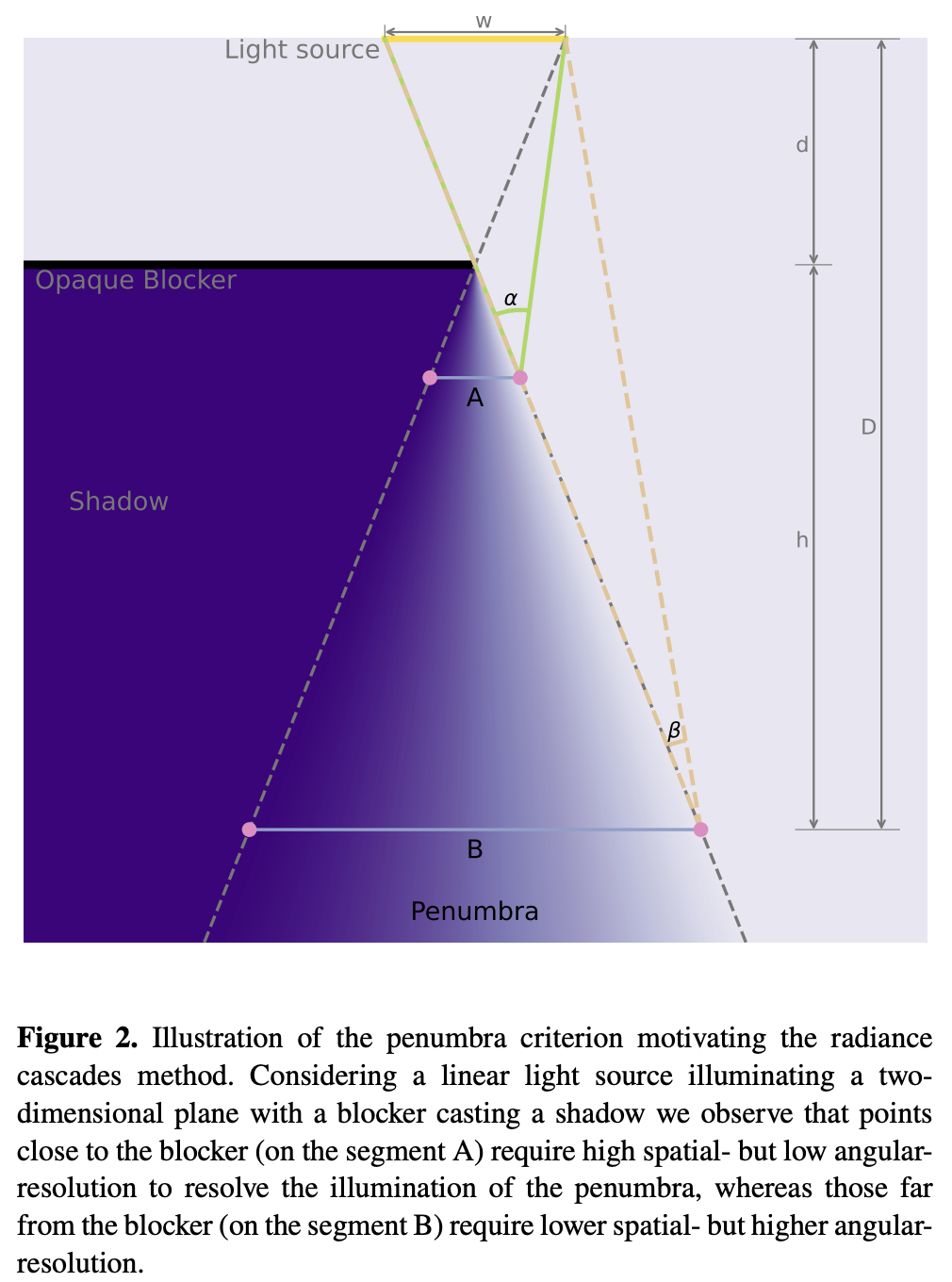
전체 파이프라인은 다음과 같습니다.
let mut rc_enc = device_handle
    .device
    .create_command_encoder(&wgpu::CommandEncoderDescriptor {
        label: Some("rc_gi"),
    });
rp.encode_distance_pass();
rp.encode_rc_cascade_passes();
rp.encode_rc_mipmap();
rp.encode_rc_apply();
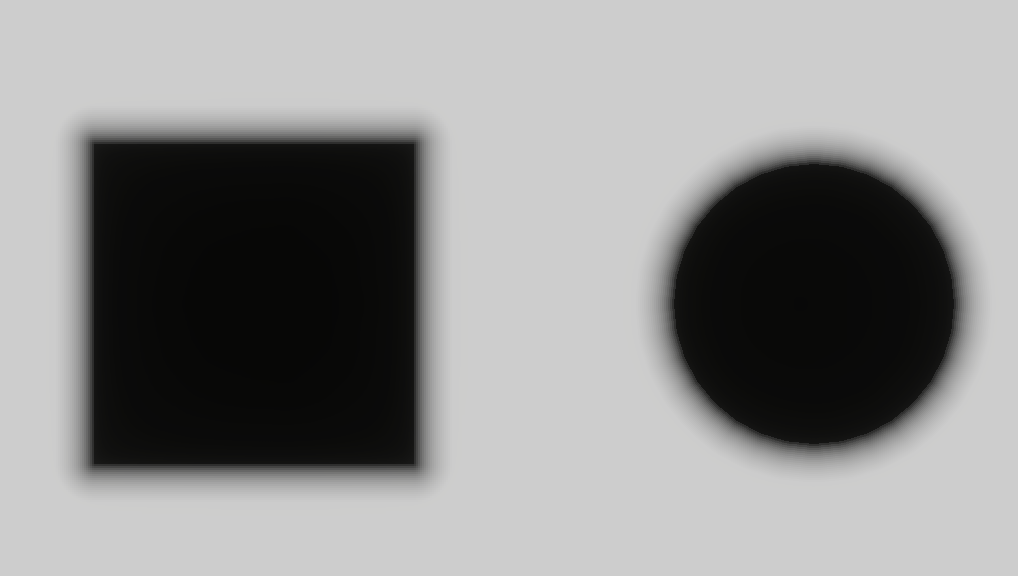
device_handle.queue.submit([rc_enc.finish()]);해석 기하부터 시작합니다. 2강 - 원 그리기와 9강 - 타원과 사각형 그리기에서 원, 타원, 사각형의 SDF를 이미 소개했습니다. 도형 경계와 도형 내부에서 거리는 0입니다. 아래 그림은 이것을 회색조로 시각화한 것으로, 원래 거리를 [0,1]로 매핑할 때 saturate(d * DIST_FIELD_VIZ_SCALE)를 사용합니다.
거리 필드 텍스처를 만들 때 정점 셰이더는 여전히 전체 화면 삼각형을 사용합니다(이전 후처리 패스와 비슷합니다). prims에는 씬의 기본 프리미티브 기하가 들어 있어 sdf_prim이 해석적 거리 필드를 평가할 수 있습니다. 최종 결과는 rc_dist에 기록됩니다. 이것은 캔버스 전체 크기의 텍스처이며, R16F 형식으로 부호 없는 거리를 저장합니다.
@group(0) @binding(0) var<uniform> header: DistHeader;
@group(0) @binding(1) var<storage, read> prims: array<GpuRcPrim>;

@fragment
fn dist_fs(i: VsOut) -> @location(0) vec4<f32> {
  var d = 1e6;
  let n = header.count;
  for (var i = 0u; i < 64u; i = i + 1u) {
    if i >= n { break; }
    d = min(d, sdf_prim(p_canvas, prims[i]));
  }
  // d is union SDF: inside <0, outside >0, boundary ~=0. R stores max(d,0): 0 inside and on edges, positive outside as distance to boundary.
  return vec4(max(d, 0.0), 0.0, 0.0, 1.0);
}
지금은 Rect, Ellipse, Line, Polyline만 지원합니다. 다른 SDF는 distfunctions2d를 참고하세요.
bevy_radiance_cascades 구현은 거리 필드를 병렬로 생성하는 Jump Flood Algorithm(JFA)을 사용합니다. 핵심은 지수적으로 줄어드는 "점프 간격"으로 log₂(N) 라운드 안에 정보를 격자 전체로 퍼뜨리는 것입니다.
texture_2d<u32>(시드 좌표를 저장합니다).이렇게 하면 레이 마칭이 고정된 아주 작은 간격 대신, 다음 표면까지 크고 안전한 간격으로 나아갈 수 있습니다.
Fundamentals of Radiance Cascades
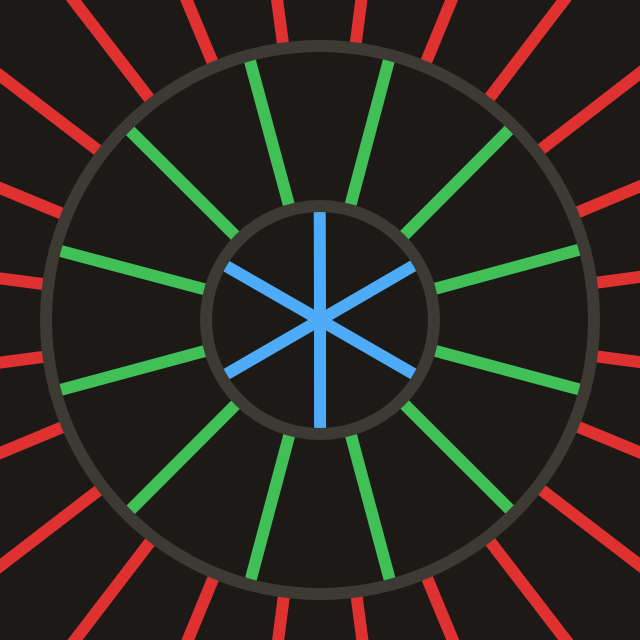
캐스케이드는 기본적으로 프로브의 격자이며, 모든 프로브가 같은 속성을 가집니다. (예를 들어 구간 개수, 구간 길이, 프로브 간격)
각 Probe의 구조는 다음과 같습니다. std140 정렬로 GPU에 올릴 때는 패딩을 고려해야 합니다.
pub struct Probe {
    pub width: u32, // texel footprint per probe and ray count (angular discretization)
    pub start: f32, // where this ray segment starts from the probe center
    pub range: f32, // how far this cascade traces along the ray from start
}

pub fn probe_for_cascade(c: u32, resolution_factor: u32, interval0: f32) -> Probe {
    let width = 1u32 << (c + resolution_factor);
    let start = interval0 * (1.0 - 4.0_f32.powi(c as i32)) / -3.0;
    let range = interval0 * 4.0_f32.powi(c as i32);
    Probe {
        width,
        start,
        range,
    }
}
캔버스 대각선 길이로 필요한 캐스케이드 수를 계산합니다.
pub fn cascade_count_for_gi_size(gi_w: u32, gi_h: u32) -> usize {
    let diag = ((gi_w * gi_w + gi_h * gi_h) as f32).sqrt();
    cascade_count_for_diagonal(diag, RC_INTERVAL0, RC_MAX_CASCADES).max(1)
}

pub const RC_INTERVAL0: f32 = 2.0;
pub const RC_MAX_CASCADES: usize = 16;
캔버스를 초기화할 때 Probe 유니폼을 할당합니다.
for c in 0..cascade_count {
    let p = probe_for_cascade(c as u32, RC_RESOLUTION_FACTOR, RC_INTERVAL0);
    let slot = ProbeUniformSlotPadded::from_probe(&p);
    queue.write_buffer(
        &self.rc_probe_dynamic_buf,
        (c * PROBE_UNIFORM_STRIDE) as u64,
        bytemuck::bytes_of(&slot),
    );
}
CPU 쪽 스케줄링은 두 파이프라인으로 나뉘며, rc_ping_a와 rc_ping_b 두 텍스처가 필요합니다.
let rc_usage =
    TextureUsages::STORAGE_BINDING | TextureUsages::TEXTURE_BINDING | TextureUsages::COPY_SRC;
let (rc_a, rc_a_view) = mk_sz(
    device,
    "rc_ping_a",
    TextureFormat::Rgba16Float,
    rc_usage,
    gi_width,
    gi_height,
);
// rc_ping_b is the same
첫 번째 파이프라인은 rc_ping_a를 읽고 rc_ping_b에 쓰며, 가장 먼 구간부터 시작합니다.
let mut pass = encoder.begin_compute_pass(&ComputePassDescriptor {
    label: Some("radiance_cascades_first_pass"),
    timestamp_writes: None,
});
pass.set_pipeline(&self.rc_cascade_first_pipeline);
pass.set_bind_group(0, &radiance_cascades_10, &[first_offset]);
pass.dispatch_workgroups(gw, gh, 1);
두 번째 파이프라인은 핑퐁을 위해 radiance_cascades_01 / 10 바인드 그룹을 번갈아 사용합니다(rc_ping_a / rc_ping_b에 차례로 기록). 그런 다음 단계마다 맞는 Probe 오프셋을 써서, 더 작은 c를 향해 레벨별로 병합합니다.
let mut merge_pass = encoder.begin_compute_pass(&ComputePassDescriptor {
    label: Some("radiance_cascades_merge_passes"),
    timestamp_writes: None,
});
merge_pass.set_pipeline(&self.rc_cascade_merge_pipeline);
for pass_i in 1..cascade_count {
    let cascade_idx = cascade_count - 1 - pass_i;
    let dyn_off = (cascade_idx * PROBE_UNIFORM_STRIDE) as u32;
    let merge_idx = pass_i - 1;
    let bg = if merge_idx % 2 == 0 {
        &radiance_cascades_01
    } else {
        &radiance_cascades_10
    };
    merge_pass.set_bind_group(0, bg, &[dyn_off]);
    merge_pass.dispatch_workgroups(gw, gh, 1);
}
첫 패스와 이후의 핑퐁 컴퓨트 패스는 같은 광선 디스패치 논리를 사용합니다.
@compute @workgroup_size(8, 8, 1)
fn rc_cascade_first(@builtin(global_invocation_id) gid: vec3<u32>) {
  radiance_dispatch(0u, gid);
}

@compute @workgroup_size(8, 8, 1)
fn rc_cascade_merge(@builtin(global_invocation_id) gid: vec3<u32>) {
  radiance_dispatch(1u, gid);
}각 컴퓨트 셰이더 스레드는 GI 캐스케이드 텍스처의 텍셀 하나를 처리합니다.
width² 블록 안의 국소 위치에서 방향을 고릅니다.start만큼 옮겨 레이 마칭 시작점을 얻습니다.프로브 블록 하나 안에서 텍셀마다 방향이 다릅니다. 블록에는 width²개의 방향 샘플이 들어 있습니다. 아래 설명 영상은 Fundamentals of Radiance Cascades에서 가져왔습니다.
let probe_texel = vec2<u32>(base_coord.x % probe_w, base_coord.y % probe_w);

// Flatten 2D local coords into ray IDs in 0 … probe_w²-1.
let ray_index = probe_texel.x + probe_texel.y * probe_w;
let ray_count = probe_w * probe_w;

// Uniformly split [0, 2π) into ray_count directions.
// +0.5 samples the center of each angular sector.
let ray_angle = (f32(ray_index) + 0.5) / f32(ray_count) * PI2;
let ray_dir = normalize(vec2(cos(ray_angle), sin(ray_angle)));

// Probe row/column index this texel belongs to.
let probe_cell = vec2<u32>(base_coord.x / probe_w, base_coord.y / probe_w);
// Top-left coordinate of this probe in GI texture.
let probe_coord = vec2<u32>(probe_cell.x * probe_w, probe_cell.y * probe_w);
// Probe center in GI texture.
let probe_coord_center = probe_coord + vec2<u32>(probe_w / 2u, probe_w / 2u);
// Probe center in full resolution.
let center_full = vec2<f32>(probe_coord_center) * rs.gi_scale;
충돌이 없고 병합이 켜져 있으면, merge()로 위쪽 캐스케이드에서 보간한 래디언스를 더합니다.
@group(0) @binding(5) var tex_radiance_cascades_destination: texture_storage_2d<rgba16float, write>;

fn radiance_dispatch(merge_flag: u32, gid: vec3<u32>) {
  // ...

  // Start from center + ray_dir * probe.start, not exactly at center.
  // Inner cascades already cover near field; this cascade handles farther range only.
  let origin = center_full + ray_dir * ru.probe_start;
  var color = raymarch(origin, ray_dir, ru.probe_range);
  if merge_flag != 0u && color.a != 1.0 {
    color = color + merge(probe_cell, ray_index);
  }
  textureStore(tex_radiance_cascades_destination, ...);
}픽셀에서 출발해 한 방향으로 나아가는 각 광선은 최대 MAX_RAYMARCH 걸음까지 진행합니다. 각 걸음에서 앞서 만든 거리 필드 tex_dist_field를 샘플링하고 dist만큼 앞으로 이동합니다. 거리가 < EPSILON이면 표면에 닿았거나 기하 내부에 있다고 보고, 색은 tex_main에서 바로 샘플링합니다.
fn raymarch(origin: vec2<f32>, ray_dir: vec2<f32>, range: f32) -> vec4<f32> {
    // ...
    var color = vec4(0.0);
    var covered_range = 0.0;
    for (var r = 0u; r < MAX_RAYMARCH; r = r + 1u) {
        if ( // termination
            covered_range >= range ||
            any(position >= dimensions)
        ) {
            break;
        }

        var dist = textureLoad(tex_dist_field, coord, 0).r;
        if (dist < EPSILON) {
            color = textureLoad(tex_main, coord, 0);
            break;
        }
        position = position + ray_dir * dist;
        covered_range = covered_range + dist;
    }
    return color;
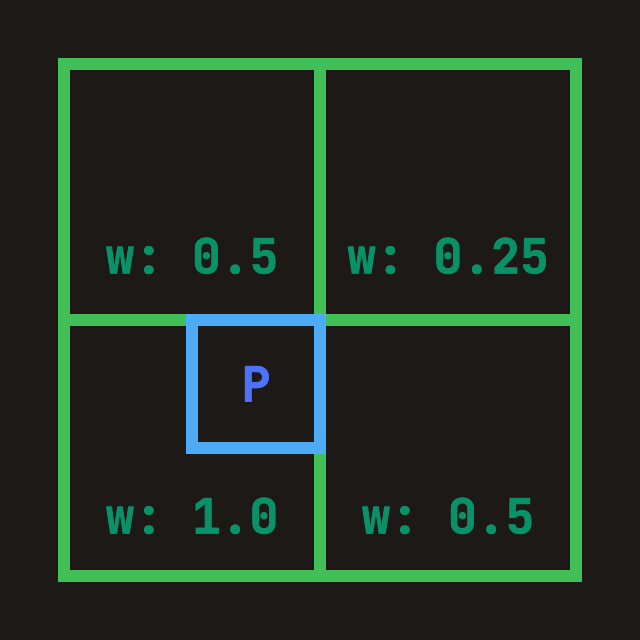
}“안쪽(더 촘촘한) 캐스케이드를 현재 레이어로 병합”합니다. 현재 프로브 너비가 W이면, 이전 캐스케이드(tex_radiance_cascades_source에 이미 기록됨)는 prev_width = 2W입니다. 즉 프로브 변 길이가 2배이고 방향 샘플은 4배입니다. 병합할 때는 다음과 같이 합니다.
ray_index*4 … +3)을 현재의 거친 방향에 대응시킵니다.fn merge(probe_cell: vec2<u32>, ray_index: u32) -> vec4<f32> {
let dimensions = textureDimensions(tex_radiance_cascades_source);
// Probe edge length in previous cascade texture.
// Current is W, previous is 2W, so previous has 4x rays.
let prev_width = probe.width * 2u;
let prev_ray_index_start = ray_index * 4u;
for (var p = 0u; p < 4u; p = p + 1u) {
let prev_ray_index = prev_ray_index_start + p;
let offset_coord = vec2<u32>(
prev_ray_index % prev_width,
prev_ray_index / prev_width,
);
// Sample all four spatial corners
TL = TL + fetch_cascade(
probe_cell_i,
probe_correction_offset + vec2<i32>(-1, -1),
offset_coord,
dimensions,
prev_width,
);
// TR / BL / BR omitted
}
let weight = vec2<f32>(0.75, 0.75)
- vec2<f32>(f32(probe_correction_offset.x), f32(probe_correction_offset.y)) * 0.5;
// Bilinear interpolation over accumulated corner radiance.
return mix(mix(TL, TR, weight.x), mix(BL, BR, weight.x), weight.y)
// Average the 4 fine rays into one coarse-direction result.
* 0.25;
}
WebGPU Inspector로 rc_ping_b의 최종 병합 결과를 살펴볼 수 있습니다. 충돌하지 않은 영역이 채워져 더 부드러운 반그림자가 생기는 것을 분명히 볼 수 있습니다.
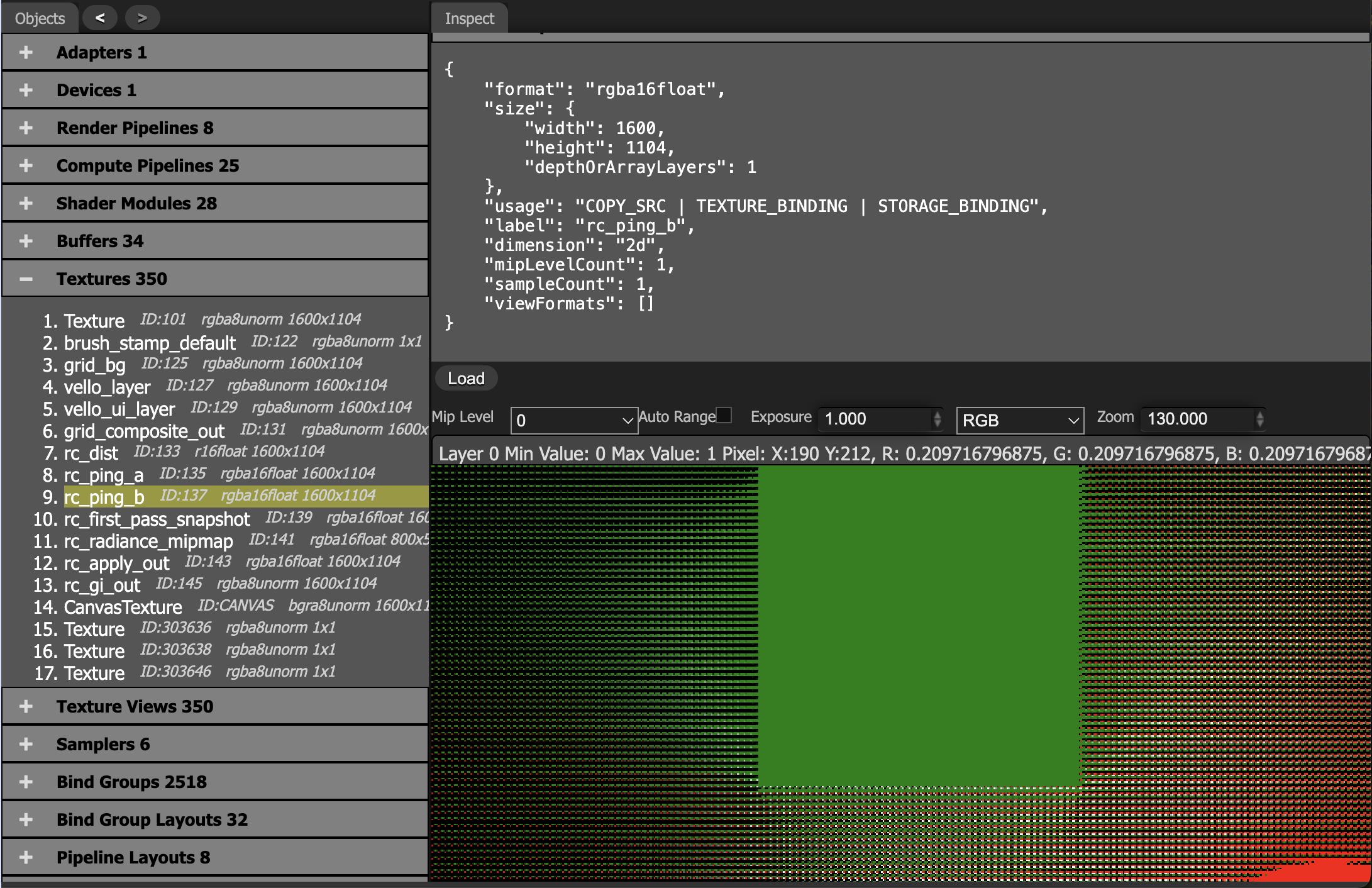
프로브 간격이 그림자 디테일 규모보다 커지면, 보간이 명암 경계를 흐리게 합니다.
최종 캐스케이드 결과를 프로브 격자 위에서 평균 내어, 다운샘플링한 radiance_mipmap에 기록합니다.
@group(0) @binding(0) var<uniform> probe: MipmapProbe;
@group(0) @binding(1) var tex_radiance_cascades: texture_2d<f32>;
@group(0) @binding(2) var tex_radiance_mipmap: texture_storage_2d<rgba16float, write>;

@compute @workgroup_size(8, 8, 1)
fn rc_radiance_mipmap(@builtin(global_invocation_id) global_id: vec3<u32>) {
  let base_coord = global_id.xy;
  let dimensions = textureDimensions(tex_radiance_mipmap);
  if any(base_coord >= dimensions) {
    return;
  }
  let pw = probe.width;
  let ray_count = pw * 2u;
  let probe_cell = base_coord * vec2<u32>(pw, pw);
  var accumulation = vec4(0.0);
  for (var y = 0u; y < pw; y = y + 1u) {
    for (var x = 0u; x < pw; x = x + 1u) {
      let coord = vec2<i32>(i32(probe_cell.x + x), i32(probe_cell.y + y));
      accumulation = accumulation + textureLoad(tex_radiance_cascades, coord, 0);
    }
  }
  accumulation = accumulation / f32(ray_count);
  textureStore(tex_radiance_mipmap, vec2<i32>(base_coord), accumulation);
}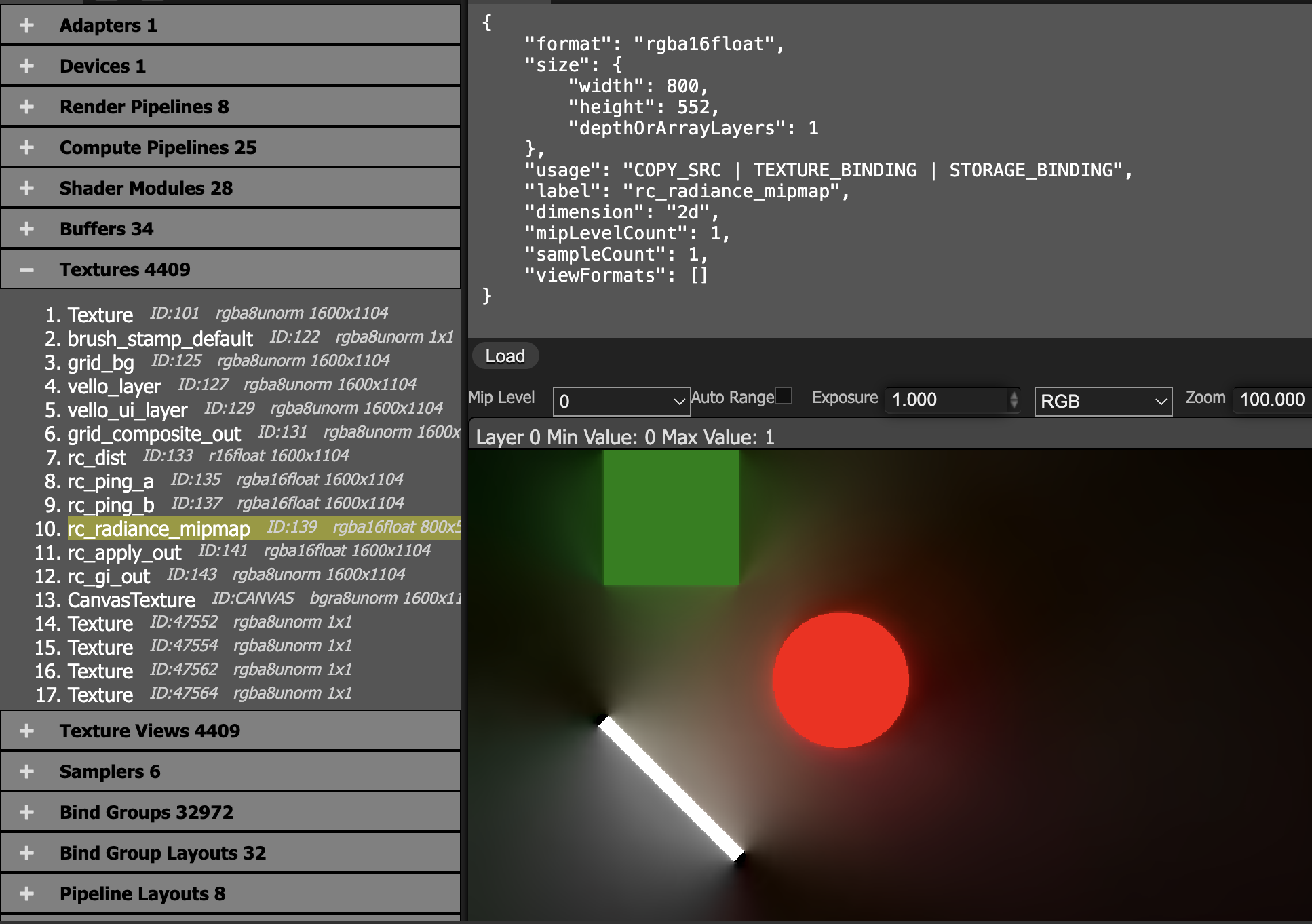
main + radiance_mipmap: 간접광을 주 색에 다시 더합니다.
@group(0) @binding(0) var tex_main: texture_2d<f32>;
@group(0) @binding(1) var sampler_main: sampler;
@group(0) @binding(2) var tex_radiance_mipmap: texture_2d<f32>;
@group(0) @binding(3) var sampler_radiance_mipmap: sampler;

@fragment
fn rc_apply_fs(i: VsOut) -> @location(0) vec4<f32> {
  let uv = vec2(i.ndc.x * 0.5 + 0.5, 0.5 - i.ndc.y * 0.5);
  let main = textureSample(tex_main, sampler_main, uv);
  let radiance = textureSample(tex_radiance_mipmap, sampler_radiance_mipmap, uv);
  return main + radiance;
}
밉맵에는 선형 샘플러를 사용합니다.
let sampler_rc_mipmap = device.create_sampler(&SamplerDescriptor {
    label: Some("rc_mipmap_sampler"),
    mag_filter: FilterMode::Linear,
    min_filter: FilterMode::Linear,
    mipmap_filter: MipmapFilterMode::Nearest,
    ..Default::default()
});| 고전 RC (2024년 및 그 이전) | 홀로그래픽 RC (HRC) |
|---|---|
| 이산 프로브: 광선 평균을 격자점에 저장합니다 | 홀로그래픽 경계: 방향성 조명을 경계에 저장합니다 |
| 쌍선형 보간: 단단한 그림자 가장자리를 부드럽게 합니다 | 경계 적분 재구성: 불연속을 유지합니다 |
| 부드러운 그림자만: 간접광과 환경광에 적합합니다 | 단단한 그림자와 부드러운 그림자: 점광원의 선명한 그림자 가장자리를 유지합니다 |